§ 8 — C#: From Scratch
Methods
It’s time to talk about something new in C#.
Among the most important things you need to learn in C# is how to organize your code and how to make your code make sense and easy to read.
An essential skill you will require when you’re building your software is trying to encapsulate your code into methods.
Let’s get into how we can build a method.
Let’s say we’re building a method in here that will add 2 numbers. What I expect my method to return when it adds two numbers, is that it will also return a number.
namespace Demo.App
{
    class Program
    {
        static void Main(string[] args)
        {

        }

        int Calculate()
    }
}
My return value type is going to be an integer in this case, so we start with int .
Then I need to give my method a name. When you’re writing methods in C#, make sure you are using an upper-case letter when you’re naming the method. Let’s name our method Calculate and be sure to use that capital C.
int Calculate()The next thing in your method to consider is to pass in parameters. If you need your method to do something that requires an input from the outside world, you need to allow or program these as parameters.
{
    static void Main(string[] args)
    {

    }

    int Calculate(int firstNumber, int secondNumber)
    {

    }
}
}
If I am adding two numbers, I am expecting my user, whoever is going to use my method, to pass me two numbers.
These are called input parameters. Let’s call our first parameter ‘firstNumber’.
The second one would be ‘secondNumber’. With this, we have a method, it’s called ‘Calculate’, and it has two parameters.
int Calculate(int firstNumber, int secondNumber)These two parameters are what we’re going to use within that method to execute a calculation. Let’s say we want to add these two numbers. In order for you to calculate that, let’s define a variable and let’s call it ‘total’.
int Calculate(int firstNumber, int secondNumber)
{
    int total = firstNumber + secondNumber;
    return total;
}
}
}
Let’s say ‘total’ is ‘firstNumber’ plus the ‘secondNumber’, and then we want to give back this total to whoever is using that method.
We will say ‘return total’.
int total = firstNumber + secondNumber;
return total;
This way I’ve taken two numbers, I’m adding them up inside my method, and pushing that value out.
Someone might say I can simplify this operation by simply saying, “here is what am simply returning”. It’s one less line of code.
}

int Calculate(int firstNumber, int secondNumber)
{
    return firstNumber + secondNumber;
}
}
return firstNumber + secondNumber;Still works.
class Program
{
    static void Main(string[] args)
    {
        int total = Calculate()
    }

    int Calculate(int firstNumber, int secondNumber)
    {
        return firstNumber + secondNumber;
    }
}
Let’s see how we can use this method we have created.
Let’s say I have an integer total and I want to take the value out of that method and put it into a variable.
int total = Calculate()All I have to do is call that method, which is calculate. We are pulling the value out of our method (whatever the total is of firstNumber + secondNumber). Let’s put this method in as a static method. We will talk about what static means a little bit later. For now, let’s call it static. Type static in to the left of your int.
static int Calculate(int firstNumber, int secondNumber)static void Main(string[] args)
{
int total = Calculate()
}
static int Calculate(int firstNumber, int secondNumber)
{
return firstNumber + secondNumber;
}
}
}So this is static, and we want to pass in 2 variables.
In order to know what the parameters are, you can press ctrl+shift+space, and that will show you what the input parameters are.
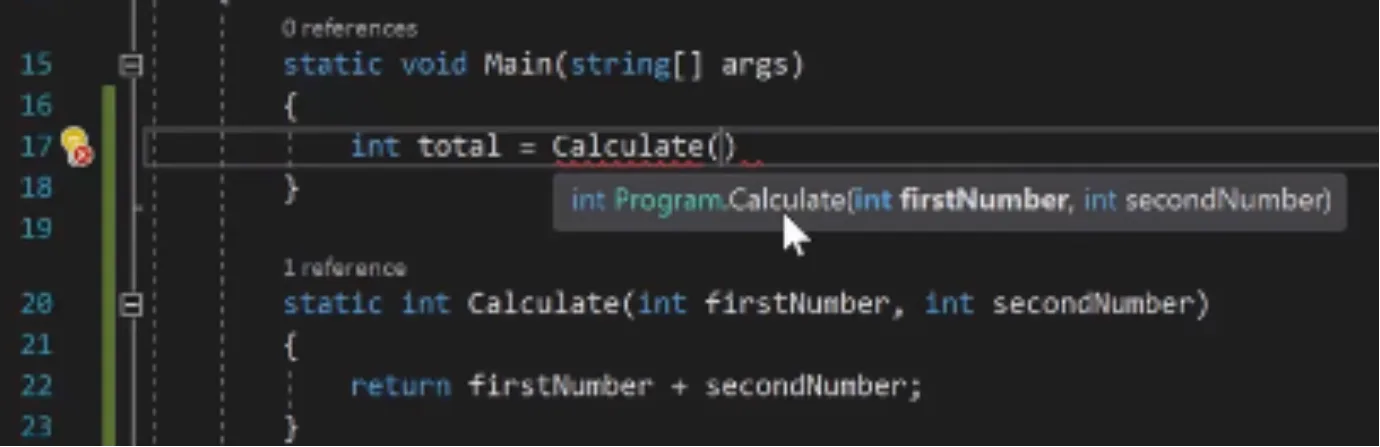
static void Main(string[] args)
{
    int total = Calculate()
}

static int Calculate(int firstNumber, int secondNumber)
{
    return firstNumber + secondNumber;
}
Make sure your input parameters make sense and are named properly. This is so the user who is going to use your method knows what to do with it.
static void Main(string[] args)
{
    int total = Calculate(1, 2);
}
Let’s say I’m passing in 1, and 2. Let’s add a couple lines of code:
Console.WriteLine(total);
class Program
{
    static void Main(string[] args)
    {
        int total = Calculate(1, 2);
        Console.WriteLine(total);
        Console.ReadKey();
    }

    static int Calculate(int firstNumber, int secondNumber)
    {
        return firstNumber + secondNumber;
    }
}Console.ReadKey();Now if you run your method, what will happen is it is going to calculate 1+2=3. With
Calculate(1, 2); you’ve set values to your
int firstNumber, and int secondNumber. And it will print it on the console and the console will stay until you press any key. It prints a 3 as expected.

Also a best practice for you when using methods, is to use the alias of these parameters. If you’re passing in raw data like 1 and 2, I highly recommend that you use the alias.
An alias here is a name of the input parameter that you’re passing to your function, so if you’re passing a number such as 1, define that by using the colon to indicate what value you are passing.
In our case here Calculate(firstNumber:1 … )
It indicates that we are passing the value 1 to the firstNumber input parameter of the Calculate method.
You should always do this unless your number is defined in a variable, such as:
int firstNumber = 1;Calculate(firstNumber, …)
Since your variable already has a name, you don’t have to use an alias for that.
The alias makes it clear what value you’re passing in. This way your method is a lot more readable, and makes a lot of sense.
static void Main(string[] args)
{
    int total = AddTwoNumber(firstNumber: 1, secondNumber: 2);
    Console.WriteLine(total);
    Console.ReadKey();
}

static int AddTwoNumber(int firstNumber, int secondNumber)
{
    return firstNumber + secondNumber;
}
If you can recall from before, I mentioned that you want your method name to encapsulate what the method is doing.
‘Calculate’ is not very descriptive. Let’s call it:
AddTwoNumber.
When you change your method name, you can press ctrl+period, and it will let you change that name across all of your code.
static void Main(string[] args)
{
    int total = AddTwoNumber(firstNumber: 1, secondNumber: 2);
    Console.WriteLine(total);
    Console.ReadKey();
}

static int AddTwoNumber(int firstNumber, int secondNumber)
{
    return firstNumber + secondNumber;
}
Here’s another example. If we change AddTwoNumber to AddTwoNumbers…
}

static int AddTwoNumbers(int firstNumber, int secondNumber)
{
    return firstNumber + secondNumber;
}
…say we want to change the method name across all the code. You’ll see that visual studio gives you that option.
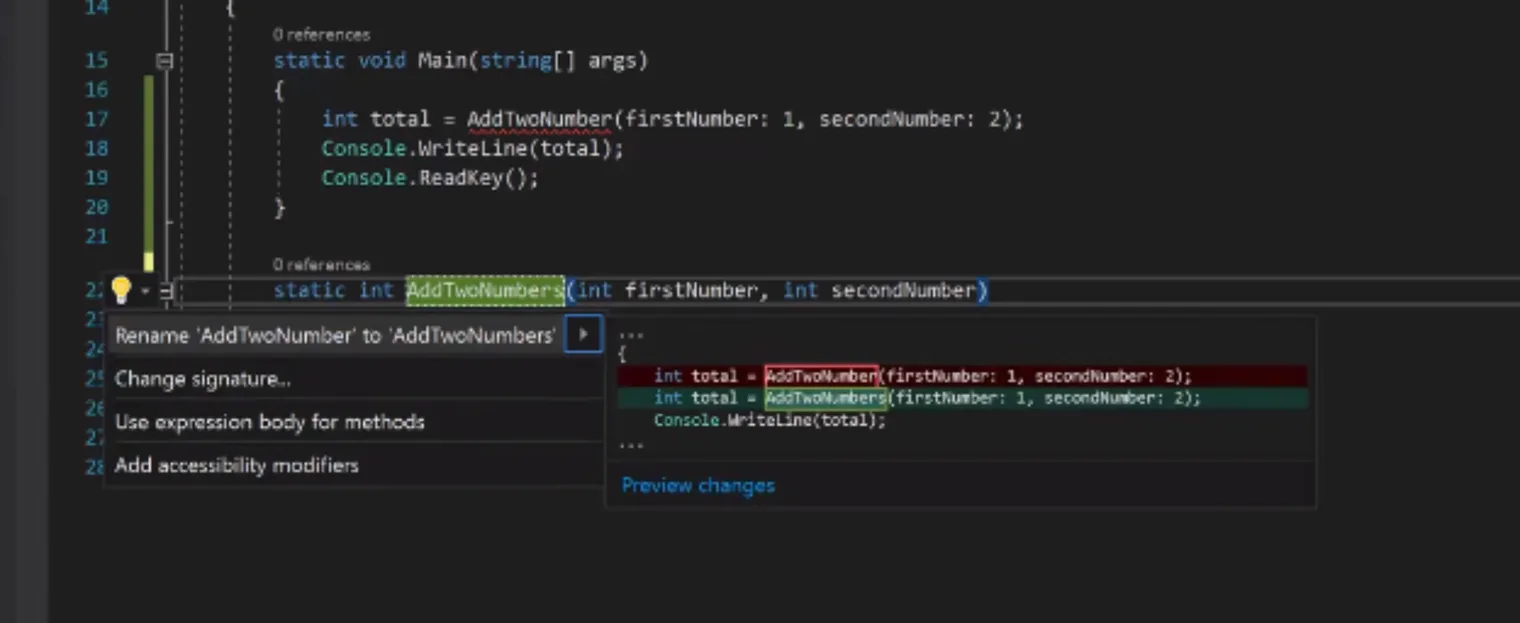
static void Main(string[] args)
{
    int total = AddTwoNumber(firstNumber: 1, secondNumber: 2);
    Console.WriteLine(total);
    Console.ReadKey();
}

static int AddTwoNumbers(int firstNumber, int secondNumber)
If you go to ctrl+period, it will rename all the occurences. If you have a massive code base and this method is being used all over, this will stop you from changing it all the time. Visual studio can automatically rename your code this way.
Methods allow you to add, remove, due whatever you want to do with it. Just encapsulate that code somewhere far,far away from what your code is trying to.
Your assignment from this chapter is to do all kinds of different methods. Can we call or define a method within an existing method?